
Vet school covers how to read a radiograph. It doesn’t cover how to actually configure the room it comes from — table type, generator power class, electrical requirements, or how a dental unit fits into the same imaging suite. That’s not a curriculum gap by accident; it’s a facilities and equipment decision, and most of us only really learn it when we’re standing in an empty exam room trying to figure out what to buy.
This guide walks through the practical side of configuring a fixed veterinary x-ray setup: table types, generator power considerations, installation logistics, and how a separate dental unit fits into the picture — the kind of decision that shapes your clinic’s workflow for the next decade, not just the next radiograph.
Table Configuration: 4-Way Float vs. Floor Track
The table underneath the generator affects positioning speed and patient safety as much as the generator itself does:
- 4-way floating tabletop. A table that moves freely in all directions lets you position a patient once and move the table around them, rather than repeatedly lifting or shifting the animal. This matters most with larger, painful, or sedated patients where minimizing movement is a real welfare consideration, not just a convenience. Intriquip’s Uveo HF400 Complete Plus offers an enhanced four-way float range (600mm left-right, 200mm front-back) built around exactly this need.
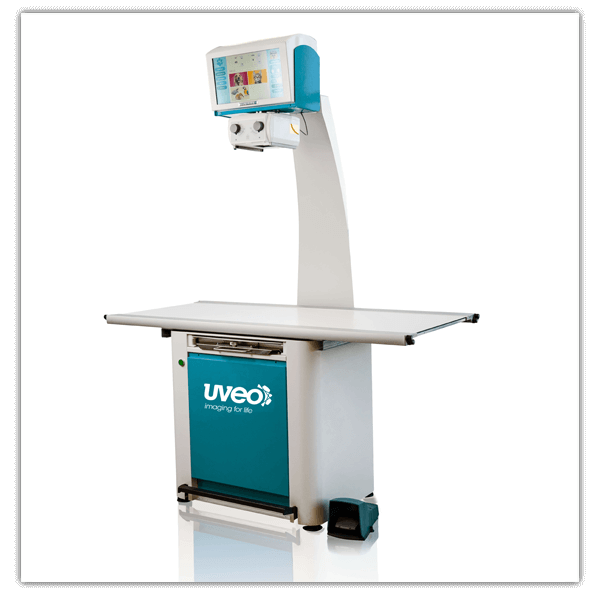
- Floor track systems. Rather than a floating tabletop, a floor track setup moves the tube stand along a track mounted to the floor, which can suit clinics prioritizing a fixed, high-throughput imaging room layout. Intriquip’s Uveo HF400-FT floor track table is built for this configuration.
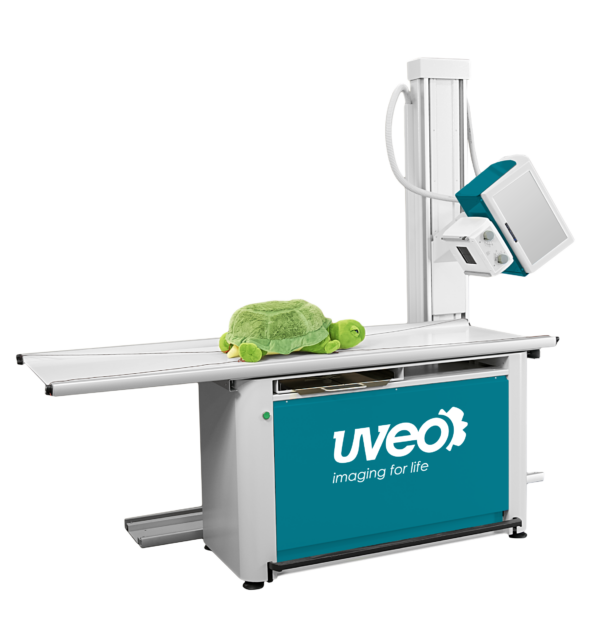
- Enhanced float range upgrades. Some systems, like the Uveo HF400 II Plus, offer a further-enhanced float range and secure table-top locking, worth considering if your practice handles larger or less cooperative patients regularly.
Neither configuration is universally correct — it depends on your exam room’s physical layout, your typical patient size range, and whether you’re retrofitting an existing room or building one from scratch.
Table Configuration at a Glance
| 4-Way Float Tabletop | Floor Track System | Enhanced Float Range | |
|---|---|---|---|
| Patient positioning | Table moves around a stationary patient | Tube stand moves along a fixed track | Table moves around a stationary patient, wider range |
| Best for | Frequent repositioning, larger/painful patients | Fixed, high-throughput room layouts | Larger or less cooperative patients |
| Installation | Standard tabletop installation | Requires floor-mounted track hardware | Standard tabletop installation |
| Example system | Uveo HF400 Complete Plus | Uveo HF400-FT | Uveo HF400 II Plus |
| Room layout impact | Moderate – table needs float clearance | Higher – track affects room design | Moderate – table needs float clearance |
If you’re retrofitting an existing exam room rather than building one from scratch, tabletop-based systems (float or enhanced float) are generally easier to fit into a space that wasn’t originally designed around a track system.
Signs Your Current Setup Is Working Against You
A few signs suggest your table or generator configuration — not just your imaging technology — is the actual bottleneck:
- Staff are physically lifting or repositioning patients more than the table is doing the work. If your current tabletop doesn’t float, or floats in a limited range, you’re likely spending more time and more physical effort per exposure than a properly configured system would require.
- Your generator can’t consistently penetrate your largest patients. If certain views routinely come out underexposed or require a second attempt on bigger dogs or mixed-practice cases, that’s a power output problem, not a technique problem.
- Dental cases are being awkwardly worked around your main system instead of using dedicated dental equipment, slowing down both dental and general imaging workflows.
- You’re avoiding remote consultations because your current system doesn’t support network-based image sharing, even though a specialist opinion would help.
None of these are reasons to panic-buy a new system, but if two or more sound familiar, it’s a sign the room configuration itself — not just the age of your equipment — deserves a second look.
Generator Power: Matching kVp and mA to Your Caseload
Generator power specifications aren’t just a number on a spec sheet — they determine whether you can actually get a diagnostic image on the patients you see most:
- Standard 110V AC installations are worth prioritizing if you want to avoid the cost of dedicated electrical wiring. Systems like the HF400 Complete Plus are specifically built to plug into a regular 110-volt, 15-amp outlet, which keeps installation costs down and simplifies retrofitting into an existing exam room.
- Capacitor-based generators tend to offer a longer service life than battery-based systems and provide the high-performance output needed for consistent image quality across a full day of cases.
- Network connectivity is worth checking before you buy — some fixed systems can connect to your clinic network for remote, web-based diagnostics, which matters if you plan to consult with a specialist or read images from another room or location.
Don’t Forget Dental: A Separate Imaging Need in the Same Suite
Dental radiography is a distinct piece of equipment from your main table-and-generator system, and it’s easy to underbudget for it when planning a new or renovated imaging suite. If your practice does regular dental work, a dedicated mobile dental x-ray unit — like the Dentalaire DC Mobile, with its ergonomic touchscreen control and aluminum positioning arm — lets you handle intraoral imaging without adapting your main table system for a job it wasn’t built for.
Fixed vs. Portable: A Quick Note on Scope
This guide focuses on fixed, in-clinic table and generator configurations. If your practice does regular farm calls, ambulatory equine work, or needs imaging capability outside a permanent room, that’s a different equipment category with its own tradeoffs around power source and detector ruggedization — worth a separate conversation with your supplier rather than trying to make a fixed system do double duty.
What to Compare Before You Buy
- Table type and float range — match this to your actual patient size range and positioning needs, not just what’s cheapest.
- Generator power and electrical requirements — confirm your exam room’s electrical setup matches what the system needs before you commit to an installation timeline.
- Network and software connectivity — worth prioritizing if remote consultation or specialist referral is part of your workflow.
- Dental imaging — budget for it separately if it’s part of your practice, rather than assuming your main system covers it.
- Installation and service support — ask what’s included in the purchase versus billed separately, and what happens if something needs repair down the line. Intriquip’s equipment repair services include factory-authorized warranty repairs and a loaner-equipment program, worth asking about regardless of which supplier you choose.
- Financing structure — a full table-and-generator setup is a meaningful capital investment. Intriquip’s overview of equipment financing options for Canadian clinics covers leasing and financing paths if you’d rather structure the purchase over time.
Bottom Line
The table and generator you choose shapes your clinic’s imaging workflow for years, not just the next radiograph — table type affects patient positioning and staff time, generator specs determine whether your system can actually handle your caseload, and dental imaging needs its own budget line rather than an afterthought. None of this is covered in a clinical curriculum, which is exactly why it’s worth working through deliberately before you sign a quote.
If you want to configure a table-and-generator setup around your specific exam room and caseload, Intriquip’s veterinary x-ray systems team can walk through the options.